Baseline → Advanced → Pro
Baseline is the first of three tiers. It reviews your Entra ID tenant, shows where you stand against recognised standards and best practice, and ranks what to fix first. Advanced fixes the low-friction gaps it finds and assesses every feature in your license. Pro takes on the high-friction controls, the joiner, mover and leaver process, and the training that makes the change stick.
Your Entra ID tenant is the front door to Microsoft 365 and to every third-party application you have federated to it. Its configuration decides who gets in, what they can reach, and how far an attacker travels with a compromised account.
Most tenants have drifted. Settings made years ago for reasons nobody now remembers. Privileges that were meant to be temporary. Licenses paying for controls that were never switched on.
An Entra ID security review, carried out by an experienced Entra ID consultant, shows what is working, what is at risk and what to fix first, in plain language, and hands you a prioritised plan your own people can act on.
From DKK 19,500 excl. VAT. Fixed price, confirmed before anything is collected.
More than a secure score
Microsoft Secure Score covers less than 25% of what this review checks.
Microsoft already tells you how to raise your secure score. What it cannot tell you is which of its recommendations matter in your business, which ones your regulator or your customers will ask about, and which ones you can realistically finish this quarter.
Most importantly, it cannot tell you how to build governance that is secure and convenient at the same time, so your organisation does not end up with security fatigue. That is where the real value sits.
That judgement is the work. The analysis is automated so that nothing is missed. The quality assurance and prioritisation are done by a consultant with more than a decade in identity and access management across Danish finance, pharma and public sector, including Entra ID, privileged access, and an audit finding closed for a bank supervised by Finanstilsynet.
How the Entra ID security review works


1. Initial scope alignment. An initial meeting where you tell me your expectations and concerns, and I advise on next steps. Bring both a business and a technical representative.
2. Read-only access. You follow my guide to create a service principal with reader permissions, scoped to configuration data. The app can look, it cannot change anything. No mailboxes, no files, no documents, no user content. It signs in with a certificate, not a password, and you see the full list of permissions before you grant anything. You can revoke it at any point.
3. Collection and analysis. I pull all relevant configuration and run automated checks against it. Every check is mapped to recognised public standards (CIS Microsoft 365 Foundations, the CISA SCuBA Entra ID baseline, Microsoft Entra documentation and Secure Score, and the EIDSCA Entra ID Config Analyzer), and every finding is verified against your own data. My AI automation gives you breadth. It reads every setting, which a person reviewing a tenant by hand does not.
4. Expert validation. Every finding, and the reasoning behind it, is reviewed by a CISM and CEH certified consultant before the report is issued. Nothing reaches you that a human has not checked.
5. Hand-over meeting. A presentation and a walkthrough of every finding, with a prioritised project catalogue.
What you get
You receive a short executive summary for decision makers, then the detailed findings, each with the evidence from your own tenant, why it matters and the steps to fix it. Findings are sorted into three levels by a fixed formula of severity, effort and cost, so the same tenant gives the same ranking every time:


- Concrete recommendations on user administration, feature use, privileged access, application onboarding, Conditional Access and license use.
- A short list of questions where only you know the answer.
- A walkthrough where I go through the findings with you and whoever will do the work.
A look inside the report
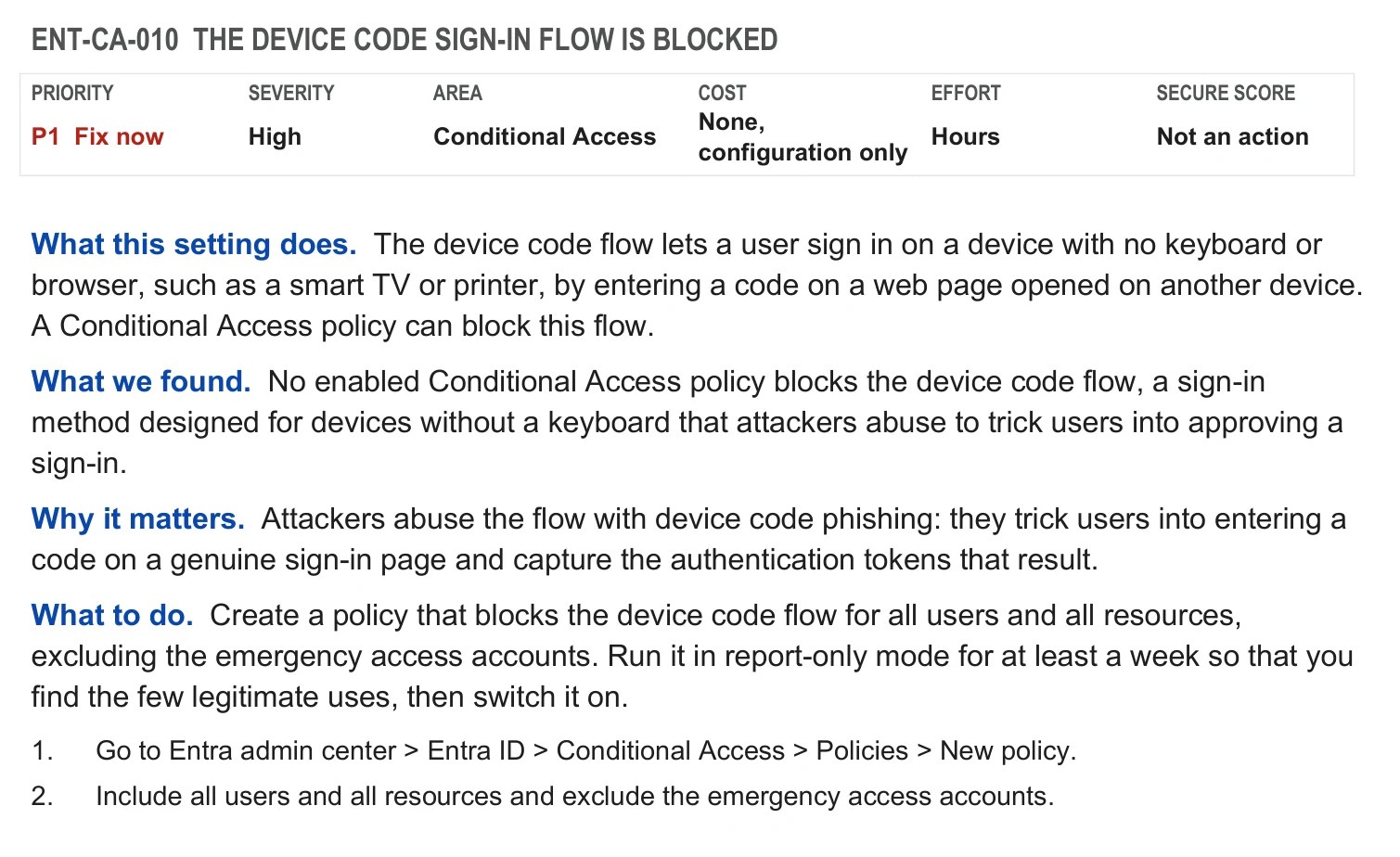
This is an extract from a sample report, written for my own sandbox tenant. Real reports are confidential to the client. The report opens with the whole picture on one page: how many controls were checked, how many are not met, how serious they are, and where to act first.


Every finding then follows the same pattern: what the setting does, what I found in your tenant, why it matters, what to do, and where to change it in the portal.
Why you can trust the result
Every result is read-only, tied to your own settings and a named public source, and signed off by a person before you see it.


What the review covers, and what it does not
The review covers every Entra ID feature that recognised public standards recommend and that your license plan includes. Every check is mapped to the CIS Microsoft 365 Foundations Benchmark, the CISA SCuBA Entra ID baseline, Microsoft’s Entra documentation and Secure Score, and EIDSCA. Features your license does not include are not assessed. If a control needs a higher license tier, it can be added as a separate task.
The review reads configuration only. It does not read your email, files, chats or any other content.
The review does not change anything in your tenant, and it does not certify you against a standard. Fixing the findings is what Advanced is for.
Are you using Microsoft Entra ID?
Entra ID as your primary cloud identity provider is the one hard requirement. It is what keeps this affordable: the analysis is automated against a platform I know in depth, rather than rebuilt for every client.
If your identities still sit in an on-premises Active Directory with no cloud identity, or you are using Google Workspace, that is a different and larger conversation. Book the call anyway and I will tell you why.

What your Microsoft licenses allow
What the review finds depends on which capabilities you already own. Part of the value of the review is finding out that you are paying for controls nobody switched on.
- Free is included with Microsoft cloud subscriptions such as Microsoft Azure, Microsoft 365, Microsoft Dynamics 365, Microsoft Intune and Microsoft Power Platform.
- E3 is Microsoft 365 E3, which includes Microsoft Entra ID P1. P1 is also available as a standalone license and is included in Microsoft 365 Business Premium.
- E5 is Microsoft 365 E5, which includes Microsoft Entra ID P2. P2 is also available as a standalone license.
- E7 is Microsoft 365 E7, which includes P1, P2, the Microsoft Entra Suite (Governance, ID Protection, Verified ID, Private Access and Internet Access) and Microsoft Agent 365.
- Suite is the Microsoft Entra Suite, which contains Governance, ID Protection, Verified ID, Private Access and Internet Access. It can be bought separately, but requires P1 or a plan that includes P1.
- Governance is the Microsoft Entra ID Governance add-on for P1 and P2. It is also included in the Microsoft Entra Suite and in Microsoft 365 E7, and it contains entitlement management, PIM and access reviews, so P1 customers get them too. A separate Step-Up version exists for P2 customers.
The table below lists the features available by license type, from the lowest license that includes them. A tick means the feature is included, a dash means it is not. It is a simplified overview, not a complete licensing matrix: some features also require licenses for specific users, such as the administrators or reviewers involved, and Microsoft changes its packaging and prices regularly. Always check Microsoft’s current licensing terms and prices before you buy.
| Feature | What it does | Free | E3 | E5 | E7 | Governance | Suite |
|---|---|---|---|---|---|---|---|
| Users and groups | Create and manage user accounts and security or Microsoft 365 groups with assigned membership. | ✔ | ✔ | ✔ | ✔ | – | – |
| Device registration and Entra join | Register personal devices and join Windows devices directly to Entra ID with single sign-on. Admins can recover BitLocker keys. | ✔ | ✔ | ✔ | ✔ | – | – |
| Basic administrative units | Split the directory into units and delegate admin rights inside one unit only. Creating units is free; each admin scoped to a unit needs P1. | ✔ | ✔ | ✔ | ✔ | – | – |
| Entra Connect Sync and Cloud Sync | Synchronize on-premises Active Directory users, groups and password hashes to Entra ID. | ✔ | ✔ | ✔ | ✔ | – | – |
| Workload identities (incl. managed identities) | Identities for software: app registrations, service principals, federation with external identity providers, and managed identities for Azure resources. | ✔ | ✔ | ✔ | ✔ | – | – |
| Agent ID | Identities and blueprints for AI agents, managed like other identities in the tenant. | ✔ | ✔ | ✔ | ✔ | – | – |
| Baseline MFA (security defaults, MFA for admins, Authenticator app) | Preconfigured baseline: requires MFA registration, blocks legacy authentication, second factor through the Authenticator app. No custom policies. | ✔ | ✔ | ✔ | ✔ | – | – |
| Passkeys (FIDO2) | Phishing-resistant passwordless sign-in with hardware security keys or passkeys. | ✔ | ✔ | ✔ | ✔ | – | – |
| Enterprise applications (SSO and user provisioning) | One sign-in for Microsoft 365, Azure and many SaaS apps, plus automatic user provisioning and removal in connected SaaS apps. | ✔ | ✔ | ✔ | ✔ | – | – |
| Audit and sign-in logs | Records of administrative changes and of user and app sign-ins (kept 7 days on Free). | ✔ | ✔ | ✔ | ✔ | – | – |
| Basic reports | Basic security and usage reports, limited Identity Protection risk reports, recommendations and the Identity Secure Score. | ✔ | ✔ | ✔ | ✔ | – | – |
| B2B guest collaboration | Invite external users as guests and control which external organizations your users and guests can collaborate with (cross-tenant access settings). | ✔ | ✔ | ✔ | ✔ | – | – |
| Verified ID (core) | Issue and verify digital credentials without storing personal data centrally. | ✔ | ✔ | ✔ | ✔ | – | – |
| Entra ID custom roles | Create your own admin roles with a chosen set of permissions. | – | ✔ | ✔ | ✔ | – | – |
| Dynamic administrative units and protected actions | Administrative units with attribute-based membership, and Conditional Access step-up before sensitive admin actions. | – | ✔ | ✔ | ✔ | – | – |
| Entra Connect Health (hybrid identity monitoring) | Monitor the health, performance and sync errors of Entra Connect, AD FS and domain controllers, with alerts. | – | ✔ | ✔ | ✔ | – | – |
| Device / group write-back | Write cloud device objects and cloud-created groups back to on-premises Active Directory, for device-based Conditional Access and on-premises group use. | – | ✔ | ✔ | ✔ | – | – |
| MDM auto-enrollment | Enroll devices in Intune or another MDM automatically when they join Entra ID, with local admin policy. | – | ✔ | ✔ | ✔ | – | – |
| Password protection (custom banned list, on-premises) | Block organization-specific weak passwords on top of the global list, also in on-premises Active Directory. | – | ✔ | ✔ | ✔ | – | – |
| Self-service password reset | Let users reset or unlock their own password, including write-back to on-premises AD. | – | ✔ | ✔ | ✔ | – | – |
| Conditional Access policies (incl. MFA methods) | E.g. compliant device, trusted location, authentication strengths, fraud alert, MFA for on-premises apps, TAP, certificate-based authentication, WHfB and token protection. | – | ✔ | ✔ | ✔ | – | – |
| Application Proxy | Publish on-premises web apps to remote users without a VPN. | – | ✔ | ✔ | ✔ | – | – |
| Advanced app access | SAML token encryption, group and on-premises provisioning to apps, and user requests for app access in My Apps. | – | ✔ | ✔ | ✔ | – | – |
| Advanced group management | Group access management, dynamic groups with rule-based membership, and self-service groups with owner approval. | – | ✔ | ✔ | ✔ | – | – |
| Advanced logs and monitoring | Longer log retention (30 days), export to SIEM or Log Analytics, Graph activity logs, Entra health with SLA reporting, advanced reports and the governance dashboard. | – | ✔ | ✔ | ✔ | – | – |
| Entra Backup and Recovery and configuration monitoring | Daily backups of tenant configuration, difference reports, recovery of changed or deleted objects and drift detection. | – | ✔ | ✔ | ✔ | – | – |
| Cross-tenant sync and multitenant organization | Automatically provision users between tenants and group several tenants into one organization. | – | ✔ | ✔ | ✔ | – | – |
| Tenant restrictions v2 and guest session controls | Control which external tenants your users can sign in to, and apply sign-in frequency and other session controls to guests. | – | ✔ | ✔ | ✔ | – | – |
| Global Secure Access: Microsoft traffic profile | Route Microsoft 365 traffic through Global Secure Access, with universal Conditional Access (compliant network check) and universal tenant restrictions. | – | ✔ | ✔ | ✔ | – | – |
| Identity Protection (risk policies, risk-based Conditional Access) | Automatic responses to risky users and sign-ins (block, MFA, password change), and risk as a Conditional Access condition. | – | – | ✔ | ✔ | – | ✔ |
| Privileged Identity Management (PIM) | Just-in-time, approval-based and time-limited activation of privileged roles, with auditing. | – | – | ✔ | ✔ | ✔ | ✔ |
| Access reviews | Recurring reviews where owners or users confirm who still needs access to groups, apps and roles. | – | – | ✔ | ✔ | ✔ | ✔ |
| Entitlement management (incl. My Access portal) | Bundle access into access packages with request, approval and expiration, requested through the My Access portal. | – | – | ✔ | ✔ | ✔ | ✔ |
| Account Discovery | Discover and review accounts in connected apps. | – | – | – | ✔ | ✔ | ✔ |
| Advanced cross-tenant sync | Cross-tenant sync for groups, cross-cloud sync between Microsoft clouds, and discovery of related tenants. | – | – | – | ✔ | ✔ | ✔ |
| PIM custom extensions for role activation | Run Logic App workflows when a privileged role is activated. | – | – | – | ✔ | ✔ | ✔ |
| Advanced access reviews | Reviews of inactive users, machine-learning assisted recommendations, and reviews across all access packages in a catalog. | – | – | – | ✔ | ✔ | ✔ |
| Advanced entitlement management | Auto assignment policies, custom extensions (Logic Apps), sponsors as approvers, and Verified ID and ID Protection integration in access requests. | – | – | – | ✔ | ✔ | ✔ |
| Lifecycle Workflows | Automate joiner, mover and leaver tasks. | – | – | – | ✔ | ✔ | ✔ |
| Protection for agents | Conditional Access and risk detection for AI agent sign-ins (Agent 365). | – | – | – | ✔ | – | – |
| Governance for agents | Access packages and lifecycle workflows for AI agents and their sponsors. | – | – | – | ✔ | – | – |
| Verified ID Face Check | Match a person’s live face against the photo in a verified credential. | – | – | – | ✔ | – | ✔ |
| Internet Access (secure web gateway) | Identity-aware secure web gateway: web filtering, TLS inspection and threat intelligence for internet traffic. | – | – | – | ✔ | – | ✔ |
| Private Access (ZTNA, VPN replacement) | Zero Trust access to private apps without a VPN, per app and with Conditional Access. | – | – | – | ✔ | – | ✔ |
When
Once the scope is aligned and I have the service principal credentials, all deliverables are ready within one week.
This is a one-off review. There is no subscription, no retainer and nothing recurring to sign. You revoke the access when the work is done.
On the tooling
The analysis pipeline is my own build, first used in client work in 2024, and it changes as the models and the platform change. What does not change is the shape of the engagement: read-only access, automated collection, AI-assisted analysis, and a certified expert who signs off on every conclusion before it reaches you. The same method and the same checks are used every time. Where you have a specific data handling requirement, I agree it in writing before anything is collected.
A review describes your configuration at the time it was taken. It is a clear, evidence-based picture, not a guarantee that nothing can go wrong. Standards are named as public references and do not imply endorsement by their publishers.
Frequently asked questions
One service principal in your tenant with reader permissions, scoped to configuration data. You create it yourself following my guide, and you revoke it the moment the review is finished. I never ask for a user account, a password, or administrator rights.
No. The permissions you grant cover configuration only: policies, role assignments, tenant settings and license allocation. Mailboxes, SharePoint, OneDrive and Teams content sit outside that access, so the answer is no by design rather than by promise.
I collect configuration rather than content. Where that configuration includes identity data, and where you have a specific requirement covering retention, location or a processing agreement, I agree it in writing before anything is collected. Your results are kept apart from those of other clients.
From DKK 19,500 excl. VAT, at a fixed price. The final price depends on the size and complexity of your tenant. I confirm it in writing before anything is collected, and if a review is not worth doing in your case, I will say so.
Then you have something worth having: a documented baseline, reviewed by someone outside your organisation, that you can put in front of an auditor, a board, or a customer’s security questionnaire. I would rather tell you that than manufacture findings.
No. The review runs on any tenant. Your license level determines which controls are available to you, and whether you are paying for capabilities that were never switched on. That is one of the things the report covers. The table above shows what each license includes.
Book a 30-minute conversation
Thirty minutes, no charge, no obligation. If a review is not worth doing in your case, I will say so.